Automations are actions Quanda performs in response to certain events. The condition for automation in a survey is that the survey has been started, that is distributed.
Adding a tag
As soon as the form is submitted, the contact is added to your list in Quanda. For the contact to be labelled, a tag has to be added to it, which is why this is the only mandatory automation.
Add new condition / Automation name / Trigger when > The form was filled in / Set action > Add tag / Schedule (minute, hour, day).
Sending an e-mail
After the form is submitted, the new contact can receive an e-mail with any message you like. The e-mail has to be created in transactional e-mails and then picked in the automation.
Add new condition / Automation name / Trigger when > The form was filled in / Set action > Send e-mail / Schedule (minute, hour, day).
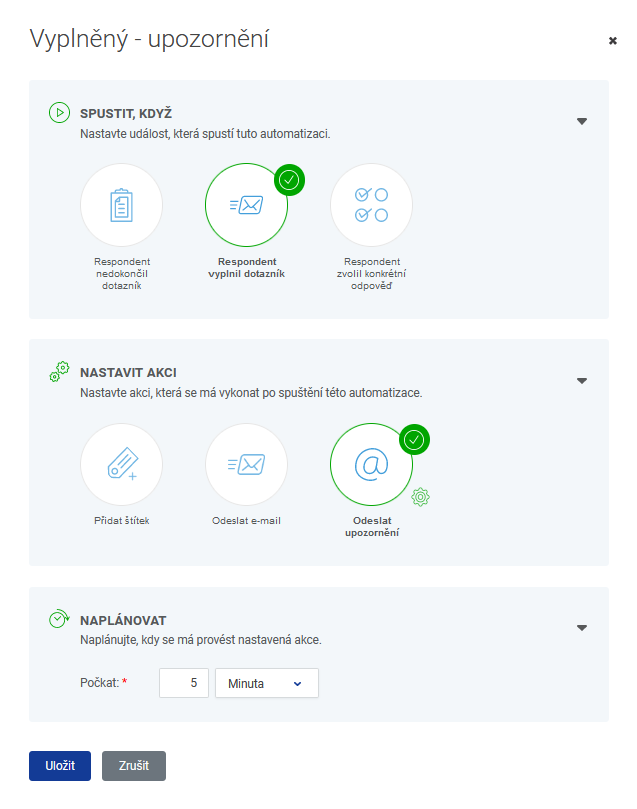
Sending a notification
If you want to keep an eye on new contacts, you can have a notification about a submitted form, that is a new contact, sent to you. You create the e-mail in transactional e-mails as well.
Add new condition / Automation name / Trigger when > The form was filled in / Set action > Send notification / Schedule (minute, hour, day).
Do you have questions? We will be happy to answer them. Just contact our customer support at +420 605 163 892, e-mail: support@onquanda.com.
Updated prosinec 30, 2021